Bodu.Formats.Excel.Binary guides
Recipe-style walk-throughs for Bodu.Formats.Excel.Binary, the narrow, read-only reader for the Excel binary workbook format (.xls) - BIFF8 (Excel 97-2003) and BIFF5 (Excel 5.0/95). It surfaces the raw cell values of each worksheet - strings, numbers, booleans, and errors, including a formula cell's cached result - without formula evaluation, styling, or higher-level interpretation.
An .xls file is a BIFF5 or BIFF8 record stream stored inside the Workbook stream of an OLE2 compound file. This package interprets the records as worksheets and cells; the container around them is read by CompoundFile, and the record framing and decoding come from BiffReader in Bodu.IO.Biff - the package is built on both.
If you are new to the library, start with the introduction, the Core concepts glossary, and the getting-started page. The guides below assume you know the vocabulary (BIFF record, workbook globals, cell kind, serial date, used range).
How the library works
ExcelBinaryWorkbook opens the .xls container, parses the workbook globals once - the date system, the shared string table, the number-format table, and the sheet directory - and lists the sheets. A sheet is read on demand by seeking to the byte offset its directory entry records, so a single sheet can be read without parsing the others and the whole workbook is never materialized.
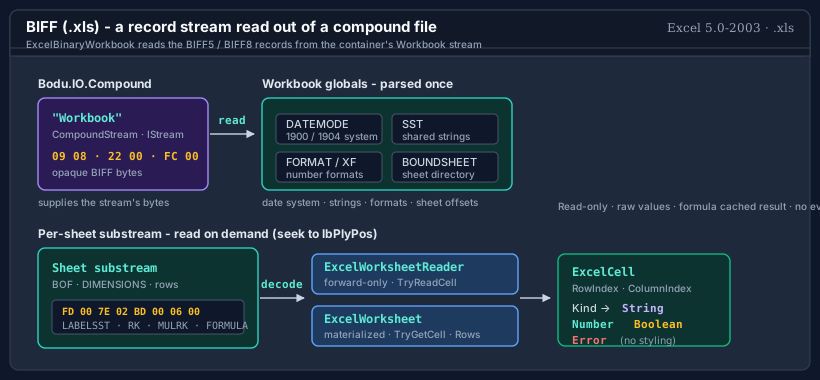
A sheet is surfaced through one of two cell surfaces: the forward-only, low-allocation ExcelWorksheetReader, or the materialized, randomly addressable ExcelWorksheet. Both yield the same sparse ExcelCell values; only the access pattern and memory profile differ.
These guides cover the read path only - the reader never writes, evaluates formulas, or applies styling.
Namespace map
| Namespace | What lives here | Guides |
|---|---|---|
| Bodu.Formats.Excel | The ExcelBinaryWorkbook session, the ExcelWorksheetReader / ExcelWorksheet surfaces, the ExcelCell value model, ExcelSerialDate / ExcelCellReference helpers, and the workbook exceptions. |
Reading workbooks · Cell values and dates · Streaming vs materialized |
Guides
Reading workbooks
Open an .xls from a path or stream, list the sheets and their used ranges, control stream ownership and optional metadata work, and read authored document properties - the end-to-end open recipe.
Cell values and dates
The ExcelCell kinds and value projections, a formula cell's cached result, date-format detection, serial-date conversion across the 1900 and 1904 systems, and A1 reference conversion.
Streaming vs materialized
The forward-only ExcelWorksheetReader (TryReadCell, ReadCells, ReadRows) versus the materialized ExcelWorksheet (TryGetCell, Rows) - when to reach for each, and how to bound allocation.
Suggested reading path
- Reading workbooks - the core open → list → read recipe that every other use builds on.
- Cell values and dates - interpret the cell kinds and turn date-formatted numbers into calendar dates.
- Streaming vs materialized - choose the access pattern that fits a one-pass scan or random access.
Where to go next
- Runnable samples - the offline ExcelReading sample under
samples/Formats.Excel/: the workbook session, forward-only streaming, materialized worksheets, and serial-date decoding over a real ~18,000-cell fixture. - Bodu.Formats.Excel API reference - every type and member.
- Bodu.IO.Compound - the container reader beneath this package.
- Bodu.IO.Biff - the BIFF5 / BIFF8 record codec beneath this package.
- Binary Formats & I/O topic guides - recipe-style walk-throughs across the topic.
- Package matrix - where Bodu.Formats.Excel.Binary sits in the suite and its dependency stack.