Bodu.IO.Compound guides
Recipe-style walk-throughs for Bodu.IO.Compound, the reader and writer for the OLE2 / Compound File Binary (CFB) container format - the structured-storage envelope used by legacy Microsoft Office files (.xls, .doc, .ppt, .msg) and other technologies.
The library has no application-format knowledge: it exposes the embedded storage hierarchy and the raw byte payload of each named stream, and leaves interpretation to the caller. The narrow BIFF8 .xls reader in Bodu.Formats.Excel.Binary is built directly on top of it.
If you are new to the library, start with the introduction, the Core concepts glossary, and the getting-started page. The guides below assume you know the vocabulary (compound file, storage, stream, sector chain, property set).
How the library works
A compound file is effectively a small file system embedded in a single file. CompoundFile is the managed counterpart of the COM StgOpenStorage entry point: navigation begins at RootStorage and descends through nested CompoundStorage containers (the COM IStorage) to CompoundStream leaves (the COM IStream). A CompoundStream is itself a seekable Stream cursor over the bytes - read-only when opened from a read-only file, read-write on a writable one.
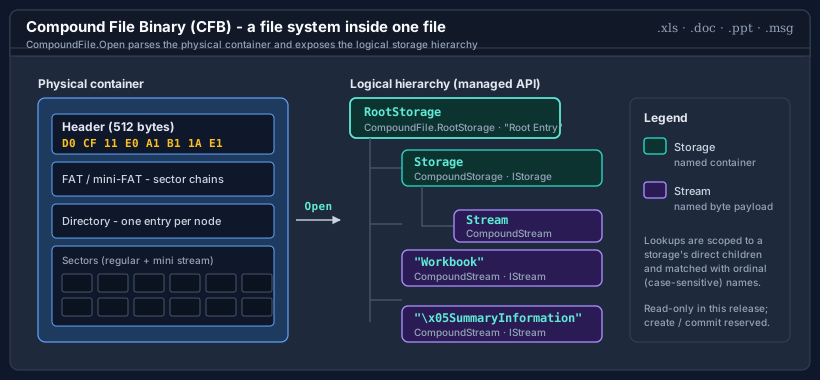
By default the whole source is buffered into memory at open time, so the file is read-only and safe to share across threads. Opening with buffered: false reads sectors on demand from a seekable stream instead, bounding memory for large files.
Most of these guides cover the read path. For writing - building a container from scratch, editing one, or embedding property sets - see Authoring compound files.
Namespace map
| Namespace | What lives here | Guides |
|---|---|---|
| Bodu.IO.Compound | The CompoundFile reader and writer, the CompoundStorage / CompoundStream hierarchy, the CompoundStream cursor, CompoundEntryInfo metadata, and the CompoundFileFormatException / CompoundStreamNotFoundException / CompoundFileSerializationException errors. |
Reading compound files · Buffered vs streaming access · Authoring compound files · Editing an existing container in place |
| Bodu.IO.Compound.Builders | The detached authoring object model - CompoundStorageBuilder, CompoundStreamBuilder, and the CompoundBuildOptions serialization options. |
Authoring compound files |
| Bodu.IO.Compound.PropertySets | The OLE property-set readers and writers - SummaryInformation, DocumentSummaryInformation, their …Builder authors, and the underlying OlePropertySet / OlePropertySection / OlePropertyValue model. |
Reading property sets · Authoring custom property sets · Authoring compound files |
Guides
Reading compound files
Open a file, probe the signature, walk the storage hierarchy with the enumerate and TryOpen surfaces, and read a named stream's bytes - the end-to-end navigation recipe.
Authoring compound files
Write a container from scratch with CompoundStorageBuilder, mutate one in place via CompoundFile.Create and Commit, edit an existing file, and embed summary-information property sets.
Editing an existing container in place
Open a .doc, .xls, or .msg for update, add, replace, rename, and delete streams through writable Stream cursors, then Commit or Revert - with the staging model and its guarantees spelled out.
Buffered vs streaming access
The buffered flag, the CompoundStream cursor, AsMemory vs chunked Read, asynchronous commit and streaming reads, lifetime and threading contracts, and how to bound memory for large files.
Reading property sets
The \x05SummaryInformation and \x05DocumentSummaryInformation metadata streams - typed accessors, the raw OlePropertySet, and the TryGet* convenience methods on CompoundFile.
Authoring custom property sets
The raw OlePropertySet / OlePropertySection / OlePropertyValue model, user-defined named properties on a document, property-set streams of your own on any storage, and round-tripping a real document's metadata.
Office format nuances
How the legacy Office documents (.xls, .doc, .ppt, .msg) lay out their named streams inside the CFB envelope, and the quirks to expect when reading them.
Suggested reading path
- Reading compound files - the core open → navigate → read recipe that every other use builds on.
- Buffered vs streaming access - once the file is too large to hold whole, or you need to control the source's lifetime.
- Reading property sets - when you want the authored document metadata (title, author, timestamps) rather than the format payload.
- Authoring compound files - when you need to write a container rather than read one.
- Editing an existing container in place and Authoring custom property sets - when the container already exists and you need to change it, or stamp it with metadata of your own.
Where to go next
- Runnable samples - the offline CompoundBasics sample under
samples/IO.Compound/: builder authoring + read-back, property sets, detection and the v3/v4 knob, a real.doc's tree. - Bodu.IO.Compound API reference - every type and member, including the Bodu.IO.Compound.Builders authoring types.
- Bodu.Formats.Excel.Binary - the BIFF8
.xlsreader built on this package. - Package matrix - where Bodu.IO.Compound sits in the suite and its dependency stack.